Customer history
Can the team keep the fields and related records needed to understand the customer history?
IfaIfa supports custom business records, fields, and relationships in a workspace.
Nothing to wire up. You describe the business in plain language, Ifa designs and builds it, and you check the plan before any of it exists.
One working record
Keep the history, owner, status, and next action for each customer in one working record. Ifa lets you shape fields, relationships, views, and lifecycle states around the way your team already handles enquiries and follow-ups.
Customer management software should give a small business one dependable record for customer history, clear ownership, current status, and the next follow-up. Ifa supports custom business records, fields, relationships, custom surfaces, and lifecycle states. Public form and survey responses can also become workspace leads when consent and privacy workflows apply.
One working record
A customer record should explain what happened without sending the next person through chat threads, inboxes, and loosely named files. In Ifa, a workspace can use custom records and fields that reflect the information the business actually needs.
Relationships connect relevant records, while lifecycle states show where each record stands. The result is a structure the team can read before replying or deciding what should happen next.
Clear responsibility
When several people can see a customer but nobody knows who is responsible, a promised reply can disappear. The workspace record should make responsibility understandable beside the customer context.
Custom surfaces can give each person a practical slice of the same record set. A team can shape those views around its operating needs instead of maintaining separate copies of customer information.
Visible progress
A generic label rarely tells a small team enough. One business may need to distinguish a new enquiry from a reply due, while another needs stages built around assessment or active service.
Ifa lets a workspace manage record lifecycle states. The names and structure can follow the business process, giving the team a shared way to see what is moving and what still needs attention.
Follow-up context
A follow-up is easier to handle when the person opening the record can see the relevant history and current state. Custom fields can hold the information the workspace needs for that decision.
The page should demonstrate this with one clearly labeled illustrative record. It must show how history, ownership, status, and a next-action field can be read together, without presenting sample activity as a customer result.
From response to record
A customer-management process may begin before a person becomes an active customer. Ifa can capture public form and survey responses as workspace leads with consent and privacy workflows.
The public response should enter a defined record structure, not an unexplained list. From there, the workspace can use its own fields, relationships, custom surfaces, and lifecycle states to organize the lead.
Small-business fit
The useful question is not how many generic features a page can name. It is whether the record structure can reflect the customer work your team performs every week.
Ifa supports configurable business records rather than one fixed customer template. During pre-launch, the appropriate next step is to describe the current process and request waitlist access. Access is reviewed for fit.
Buyer checklist
A useful comparison applies the same questions to every option. Check whether history remains readable, ownership is explicit, status reflects a real process, and the next action is visible with its context.
Also inspect how a system adapts when the business record is not a standard contact. Custom fields and relationships matter when customer work connects to enquiries, jobs, services, or other records.
Inspect before deciding
Show a real capture from the current product interface populated only with invented names and records. The label must state that it is illustrative and not a live customer account or evidence of a business outcome.
The example should connect each visible element to a supported capability. After reviewing it, a business owner can describe the present workflow and request waitlist access if the approach appears suitable.
These screens verify only the product behavior named in each caption. They do not demonstrate the page's remaining claims, provider availability, or a measured customer result.
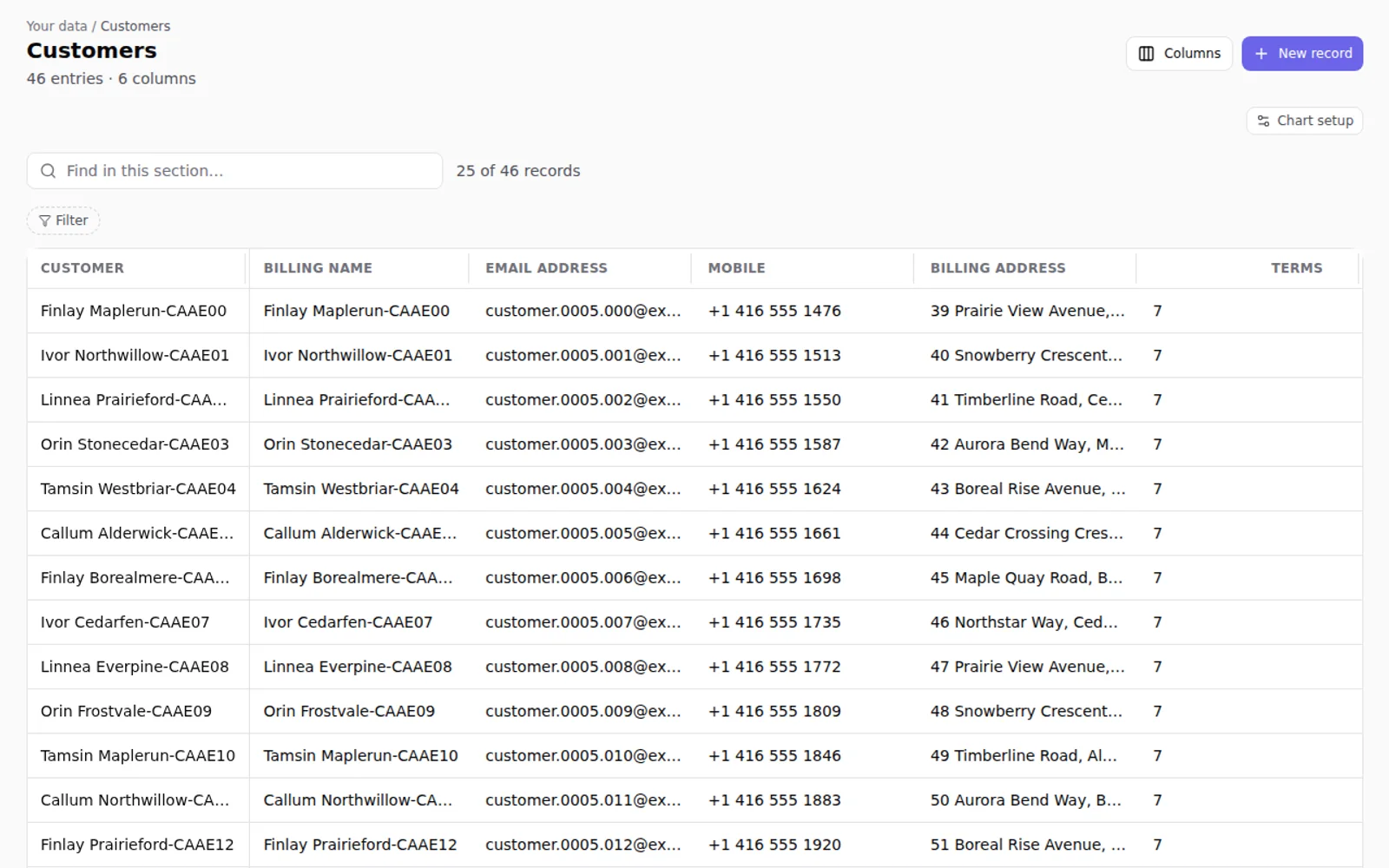
The current Ifa records table with fictional salon customer fields and rows.
Fictional workspace. This is not a customer account or a measured result.
Apply the same questions to every product you consider. The Ifa column below describes only supplied capabilities and does not rank Ifa against named alternatives.
Can the team keep the fields and related records needed to understand the customer history?
IfaIfa supports custom business records, fields, and relationships in a workspace.
Can the workspace represent responsibility in the record design and make relevant records easy to review?
IfaCustom fields can represent the information the process requires, and custom surfaces can organize records for practical review.
Can record states match the stages the business actually uses?
IfaIfa supports record lifecycle states within a configurable workspace.
Can the next action sit beside the history and current state that explain it?
IfaA workspace can include a custom next-action field alongside related records and lifecycle state, and a reminder can run as a workflow the team defines.
Can public responses enter the workspace with appropriate consent and privacy handling?
IfaIfa can capture public form and survey responses as workspace leads with consent and privacy workflows.
Whichever one answers your next question.
Show a real capture from the current product interface populated only with invented names and records. The label must state that it is illustrative and not a live customer account or evidence of a business outcome.
Fictional workspace. This is not a customer account or a measured result.
With your permission we use Google Analytics and a small set of our own events to see which pages and named actions are useful. Form values and contact details are never included. The site works either way. Read our Privacy Policy.